Showing posts with label Apps. Show all posts

Update Google Play Store & Try the app before installing

With Android smartphone you can access hundreds of very different things on Google Play , it can be found not hundreds if not thousands of app that we can use without paying anything. But something always imagined anything more than a matter of convenience because more than once I had that little problem, they have probably had all unsure whether or not to download. So Try before losing time to install , it becomes very good news.
Update Google Play Store & Try the app before installing
Just you think that after what you expected to be discharged and if you do not have WiFi at that time, not like me, you basically have to uninstall and re-start looking to find one that you like it or find it useful. The truth is that if you can become very annoying, but above all, makes us lose time. But unfortunately it is what is , or rather, it's what I had because it will change. The good news is, in a nuts,hell that Google Play with the latest update has brought new things and they will be entirely to your liking.

A few hours ago they released the Google update announcement to all users of Android in United States, Austraila, Canada and the Europe could already start using Instant Apps. You must ask What is that? Do not? Well , I think it's one of the best news that has brought Google Play because with it you can try some applications without having to install them . Although for the moment they can only try some of the simplest games, for example, but this will change in the future to be more than the amount of app that can be tested.
App trail trick google play store

How do you use Instant Apps?

The truth is that it is very simple look so easy that you don't even need to log in to Google Play. What you have to do is open the google search engine and type the name of the game you want to try on your device. When you find you have selected the option " try now ", the app will begin charging like a YouTube video so you better have a good Internet connection.

What are its advantages?

Surely you are wondering what benefits they can have for one , because from my point of view if you have them and are quite positive, because since we can test applications like a demo were helps us save a lot of time. Besides there are apps that are quite heavy so imagine having to download several hundred megabytes to finish after not liking you ... Nothing really cute?


The safest thing is that when start coming updates to improve this feature incorporated applications such as WhatsApp , Facebook and many others that are not games.

Top 5 Android Horror Games! 2016

horror games on mobile devices is always followed with interest. In This article we have compiled the most terrible of 5 Located in the Android platform mobile games. Let's see what's on techindroid.com list?
Top 5 Android Horror Games! 2016
Android most preferred types of games on the devices is undoubtedly one of the horror genre . Especially the Google Play Store 'There are dozens of games in this genre. Most of the story , gameplay in alike, including quality and it does not come to the fore in the games playability. We give first rank to Mental Hospital last game of the series and the Slendr where the game as the top 5 horror games on android we viewed the game.

Download Pokémon GO Free for Android [New version]

Download Pokémon GO Free for Android [New version]

Download Pokémon GO Free for Android [New version]

The game Pokémon GO was released a few days ago, but is not yet available in all countries. I'll let down a download link to install it and start the fun catching Pokemon. Get the official APK uploaded Niantic, Inc. so we have to worry about. To install the game Android 4.4 is needed. Continuous Internet connection and activate the GPS. The sizes of the APK is 58.06 MB. Remember, if you enjoy a good game do it in the company of your friends, everything is more fun in coexistence. In the following video you will find more information, do not miss it .

Best Screen recorder Apps for Android • 2016

Hello world, there are many Screen Recorder Apps avail for Android device. Screen recorder is a tool designed to help you take screen captures and videos quickly and efficiently, with just a single touch. 
Best Screen recorder Apps for Android
There are several options included for taking a video, and you can capture high-quality video through any of them. Screen recorder is one of the best tool for android.its better than screen shots & This tool is helps a lot to developers by using screen recorder easily make how to videos & tutorial video of any app.

At 2012 First screen recorder was entered into Android platform .That named ScreenCast recorder But, its only runs with Root. At that time screencast my favourite App.I have used it to record Game plays , Cheating coins in games etc.Now a days many App developers available for android That's why android having largest app platform .If you search for any app on google play, I bet you will found a lot of apps that do same thing. Now you may think which one is better ? best app? You can only find Best things here TechinDroid- INC 


#1. AZ Screen Recorder (No Root)


AZ Screen Recorder is the best app to record the screen of your Lollipop. It comes with awesome features ,No Root Required, no time limit, no watermark, ad free and very easy to use with one action to start and stop recording. Az Sceeen recorder App lets you record your screen at HD & full HD videos.You can also record audio from the mic and it is automatically mixed into the screencast videos. That makes it very convenient to create tutorial, promotional video, comment about your game.
AZ Screen recorder
In the settings, you can enable screen touches so the people who are watching your videos will know exactly what you are doing. If the screencast can be long and contains unnecessary information, you can trim the parts you don't want to make your videos even more impressive and less video Size.


Additionally, there are many other features in this free screen recorder such as setting video resolution, bit-rate, screen orientation, customized timer to stop, saving directory selection, view/share or delete your recorded videos
AZ Screen Recorder
You can emphasize, draw a symbol or mark something with any chosen colour directly on your screen.You can also crop recorded videos

Note: This App Requires Android 5.0 and up

Download: AZ Screen Recorder


#2. Screen Recorder


Screen Recorder is a free unlimited screen capture app for recording your device's screen to video.
Screen Recorder

Create promotional videos, make tutorials or record help videos complete with audio. Its work on lollipop without root . And below 4.4 KitKat Requires root access. By purchasing premium you can unlock all features of the app

Screen Recorder
By click on Recording quality you can adjust the video quality

Screen Recorder Features:
▪ No limit on recording time
▪ Audio recording (Pro)
▪ Android Material theme
▪ Show screen touches while recording
▪ Shake or switch screen off to stop
▪ Possibility to delay start of recording
▪ Banner during recording (Pro)

Download: Screen recorder

#3. Rec. (Screen Recorder)

Rec Screen Recorder lets you easily capture your phone/tablet screen to a MPEG4 Full-HD video + audio file at a high frame rate Without Root access.you can use this app for record ,All types of GAMES with Very High Frame Rate!, Video Tutorials, Video Calls, Promotional or demo videos for their apps, Incoming/Outgoing Phone calls, Hundreds of other purposes!


After insalling Rec (Screen recorder) open it and Set resolution ,set bit rate .You can record your voice by check on Audio option. Finally set the file name And tap Record button . now your screen activity will start capturing.
Rec. Screen Recorder
If your device is running Android 4.4, Rec. requires your device to be rooted in order to do its magic.
Rec. will work seamlessly, without root, on Android 5.0+ however


#4. Screen Recorder (No-Root)

Screen Recorder No Root is the coolest app to record the screen. And that too no root is required. This video screen recorder lets you record HD videos and you can stop these recordings by going anytime to the notification bar.
Screen Recorder (No-Root)

Floating window / Floating gadget always remain on top so that you can start the recording any time, and even stop too. Also you can press gallery button from the widget itself to see the recorded videos.
Do you want to know how you performed during a particular stage of a game? Then start recording the game using Screen Recorder No Root application. You can set bit rate from 10mbps to 8mbps and even to 2 mbps.
You can also define start delay in recording. It can be from 5 seconds to 10 seconds and even 20 seconds.
You can enable or disable recording notification also.
Screen Recorder (No-Root)
Also storage can be turned on or off for internal storage.
Portrait or Landscape orientation available. No root screen record has all the functions that you need for recording.


#5. ScreenCast Recorder

Old is Gold . All other previously shared recorders are seems compatible with some device. Doesn,t support some devices. But this Screencast recorder works with Android 4.0 & UP . It Requires Root access.Screencast captures your phone screen at high frame rates into a high quality MPEG4 video with audio. It can also take snapshots of your screen by holding the search key on your phone.
ScreenCast video recorder

This app complies with the LGPL as it uses libavcodec by FFMPEG for the encoding process. The sources used are from ffmpeg-0.8 release, and compiled without modification.


So This post is all about Best Screen recorder apps 2016.I hope this post is useful for everyone, Thanks for reading

How to get virtual numbers for WhatsApp?

How to get virtual numbers for WhatsApp?

Get virtual numbers for WhatsApp Verification 2016

WhatsApp , is the best instant messaging application in the world that is, is also a must when it comes keep in touch with others for free. register whatsapp with virtual number Therefore, more than once we try to offer all kinds of help for those users who do not have other ways to use the app than by a few little tricks about it .

To be clear, whenever we want to use a new WhatsApp account, we will have to identify with a smart mobile device , otherwise, we will have absolutely no chance that it works. For this reason, on this particular occasion, we wanted to show you how to use a website (Callcentric), which will allow you to generate a virtual number without the need for a SIM card.

Of course, if we say that the tutorial has to do more than anything to create virtual phone numbers for whatsapp, because then the first thing we have to tell you to do is go to this link where you can generate your own numbers. Once you're done, you'll see it within the site many interesting options, among which we mention just that in Make Calls appear.

When you select this option, this site gives us a list of plans and rates offered for a virtual number to both receive and make calls , but as we do not want to pay, we passed them and going to Sign Up at the top corner right. Once we meet in this section, the following will complete all fields that are required to register on the site.

When you have completed all fields on the form, the following will press the Captcha ' You see that is a process very similar to any platform- record and give it to continue. In just a few seconds, you should receive a notice indicating that the email verification is completed successfully, a fundamental step for the tutorial succeed.
Create WhatsApp Account with virtual account number

Create WhatsApp Account with virtual account number

With all the above steps finished, and we are much closer to being able to Create an account of WhatsApp with virtual number, although we have to fill out some information complementary contact, as you can see. The fill all but the Agent ID, while in State we to select New York by the zip code 10203 , giving Checking by accepting and finally to Continue.

At this time we will be able then to enter our account, then the message will ask if you are new to the site, and not only have to ignore but even skip the procedure. On the next page, we will find the option Receive Calls, to select and to enter,verify whatsapp with virtual number we see that there is an alternative "Free virtual Phone Number" , with all the numbers we can take advantage of .

Your Limitations on Instagram account and some tips

Your Limitations on Instagram account and some tips

What are the limitations of Instagram account 2016?

Instagram, like other social networks have limitations when managing and publishing content. I decided to create this post to share with you that there are limitations with this social network, in this way can take into account when managing your accounts or that of your customers.

Character Limitations


We have different places within this social network to share content, then the limitation you have in each of them.
In your profile name can not be longer than 29 characters.
Your biography of Instagram can not be longer than 150 characters.
You have up to 2200 characters for your descriptions and comments.
Comments from 240 characters are cut and left with [...]
#Triunfagram
TIP: Account history in each new content you share, people want to read your experiences and feel your emotions. Information content bored without stories behind.
Limitations on hashtags

You can only use a maximum of 30 hashtags in each content that you share. If you include more, it may be that your comment or published.
You can only tag the content itself, you can not be labeled with the contents of other hashtags.
TIPs #Triunfagram: Avoid putting many hashtags in your content and fail to add the first comment and not all in the description. You can also replace words hashtags to make it more enjoyable.
Limitations of mentions

You can only put a maximum of 20 labels in your content Instagram.
#Triunfagram TIP: Avoid labeling people who do not know, that is considered SPAM and eventually end up removing the label.
Limitations to avoid being a Spammer


  • You have a maximum of 60 follow and unfollow accounts per hour
  • You have a maximum of 60 reviews per hour
  • You have a maximum of 100 like content per hour
  • #Triunfagram 
TIP: Avoid follow and unfollow, like - minded people follow your account and you can interact with in the future so that you have quality followers and no ghosts.

other limitations

You can not post directly to Instagram via external tools because it is prohibited by the social network
External content programming tools as Latergramme / Publish can not take your content to Instagram with the description. This change is a recent social network, descriptions have to put them directly on the social network before giving publish.
What happens when if you do not meet these constraints?


  • Some descriptions and publications can not publish, you look like a mistake, but really is an issue of limitations
  • With the limitations of Spammer you can even close the account, so you should NEVER use these automated applications that I like and leave comments on certain hashtags. Instagram detects and eliminates you ever tells you. When I was writing the book #Triunfagram, I made dozens of tests with beads, and one of these payment tool version "light" Instagram closed the account. Above will not be notified, it is immediate if you do not meet their standards and conditions.
  • There are no immediate magic formulas to get thousands of followers or double your engagement, it is best to grow gradually good content strategy making use of invasive and ineffective techniques, say SPAM techniques.
This data can always consult you in section helps  Instagram or section of developers .

Best Ways to recover deleted photos android • 2016

Best Ways to recover deleted photos android
This post is for who else wants to Recover deleted photos in android without root. On your smartphone, you must have a lot of stored photos . Typically, you will again see those files when you have free time or the term is no work. At that moment, the one you'll know already how many photos you have on your phone.


If that photos was already too much, even spent three-quarters of internal and external storage, you will begin to remove them.it has become commonplace if you mistakenly delete a file , which should it be important for you. For that, Techindroid will give way to restore deleted photos on Android Listened to ya!.


How to recover deleted photos from Samsung S series phones

How to recover deleted photos from Samsung S series phones
Hello Readers, have you lost your important photos cause of you intentionally deleted it from your Samsung Smartphone. we can easily recover it by using a software on windows named Recuva Basically samsung galaxy smartphones like S,S4, S3,S5, S6 are Doesn't support USB MASS storage mode.So we have to remove SD card from Samsung S series phones.& put in to The Card Reader . This article will helps you how to recover deleted photos from samsung galaxy S S2 S6 S3 S4 S5 for free
Photos or some other important file belongs to you erased from your Samsung galaxy S Android? No need to be upset, because you can still put the photo and the file to your Android. But first you need the SD Card Reader and PC already installed Recuva , you can download Recuva  Recuva is a data recovery application that would serve to restore deleted files or lost. Here's how to restore deleted photos on Android.
  • Connect your Android memory card to the computer via the Card Reader you. Once the new connected applications open Recuva
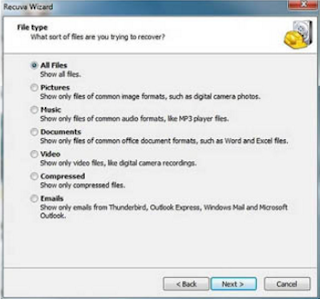
  • Select the button Next , then select the type of file you want to restore, then Next again
    recover deleted photos using Recuva
  • After that you select where the file will be saved once restored. Select In a specific location and select the button Browse to select the memory card you want to restore data or files
    How to recover deleted photos using Recuva
  • Check the Enable Deep Scan then Next . Wait until the process is complete, then the files you will be back and can be used
    How to recover deleted photos using Recuva
  • For you who want to return apart from the microSD card, you can also use Recuva to Flash Disk and Disk as well. Good luck.
    Like Facebook Page , Follow Twitter or add Google + TechinDroid to continue to get the latest information about technology and download the latest software for PC and Android Apps Free, Safe and Fast.

How to Download videos from Ozee website - 2016

Ozee entertainment is quite popular website for all category people's. With ozee you can watch your favorite TV shows and movies on 480p,720p, 1080p HD. I have been used ozee for watch CID crime show and Iru malargal respectively.
How to Download videos from Ozee

By using this trick i have Downloaded more than 200 Episodes of CID from ozee website. I have used IDM &  Video download helper as Ozee video downloader on pc .  This trick is not only for Ozee. You can Download videos from any of the online streaming websites.

How to Download Ozee videos online

For Pc users download and install Internet download manager or video download helper (Firefox Addon) 

Download Ozee videos using IDM 

  • Fist step go to Ozee.com and select the video which you want to download.
  • You will see Download option top of the Video
  • Select 360p Recomended
ozee video download
  • Now a Download confirmation message appears click on Stat Download
    Download videos from ozee website
  • That's all now your video will Start downloading. After completing the download your file will be saved at C:\Users\<your pc name>\Downloads
  • Enjoy downloading your favourite Tv shows from Ozee.

video download helper (Firefox Addon)
  • This method is only works with firefox browser
  • Download & install this ozee video downloader (firefox Addon)
  • Then Visit Ozee.com and choose the video which you want to download Just click Play button After video starts playing Pause the video & Select Ozee downloader addon

Ozee video downloader pc
  • Now select the video quality & size

Ozee video downloader pc
  • Now Ozee video Downloader will Start Download the video.Wait untill Download gets finished.
  • Downloaded files saved at C:\Users\<your pc name\dwhelper

To Download Ozee Videos on mobile

  • In this method you have to install Uc browser & Ozee video downloader .
  • Install Both Apps on your android mobile and open uc browser go to Ozee.com 
  • Choose the video .& Play online the video when it starts playing .
  • you will see Download button on playback Bar

  • Click on Download Button, it will start Download


I hope this post will useful for you,Don't Forgot to share

How to create a whatsapp account 2016

How to create a whatsapp account
WhatsApp is the most popular messenger app all over India. Whatsapp has been used by More than 10 million users & Over 100K download on playstore. Soo let's  join on whatsapp. Im going explain how to create a whatsapp account &  it completely free and easy  to use.  To create a whatsapp account All you need is smartphone (Android or iPhone or Windows ). You want to create a whatsapp account? Just follow the steps. 

Steps to Create a whatsapp account

First step you have to Download WhatsApp messager for Android or iOs or Windows as per your device platform. 

Download and install WhatsApp on your phone

Run whatsapp & accept the terms of service by clicking agree and continue button
Create a whatsapp account
Then enter your mobile number and Click Continue &  and click OK

Now wait for some secs. You will receive a message on your mobile from whatsapp company. You will receive a Confirmation Code in that message. 

Enter the verification code in whatsapp 
WhatsApp verification code
After verified successfully you will get in to your profile. Finally set up your name and profile pic. 

Have fun with whatsapp. Enjoy!! 

Android Apps Of the week 16-July

Starts from now .Each week's best Android apps of the week we prepared for you, we are with another week. This week, we bring together the best Android applications.
Android Apps Of the week 16-July

Google 's continued development, Android operating system's official application store Google Play Store , millions of Android is hosting the application.


Best new Android apps of the week
We Techindroid.com . What a team, every week Saturday 5 successful days you have Android we're bringing together the application.


Here are this week's Android apps
Another week, Android application section, we continue to rank the best new Android applications. Here are this week's Android applications.

30-Day Fitness tough task

Week health and fitness applications with the  30-Day Fitness challenging task, as the name suggests exercise creates tasks to do.  NorthPark . Android application developed by the company, the state also has the spanish language support
30 Days Fitness tough task

Download: Fitness tough task


Smart Measure

Tools category in the field takemeasur, one of the most useful applications of the week. Your smartphone application that allows you to measure length, was developed by Pressburger Associates.

Download: Smart Measure


Bluelight Filter – night mode
As the name can be understood Android it gives night mode feature to your device,  Bluelight Filter - night mode , useful in applications a week. Especially applications that are very useful for eye health,  TouchPal was developed by the company.
BlueLight Filter - Night mode

Download: Blue Light Filter  - Night mode


Documents Safe, Secure Storage
An application that you can use to keep your important files safe  Documents Safe , Secure Storage , Business of the successful application of the category. Spanish practices with the language support, KeepSafe was developed by.
Documents safe

Download: Documents safe, Secure storage


iGO Navigation
Successful navigation is perfect for those who want to practice the  iGO Navigation , Travel and takes place in the local category.  Software Developing and Commercial company developed by application, 316 MB in size.
iGO navigation free

Download: iGO Navigation

Best Messaging Apps! for Android

Smart phones are've listed the best messaging applications that you can use. Let's look closer it comes to the safe and useful applications from each other.
Best Messaging Apps! for Android
Shortly after entering our smartphones error messaging applications gained popularity. To use the phone to socialize the increased use of mobile Internet and the people who caused an increase in the number of such applications. Produced by various companies practices , sometimes very useful while it appears sometime half to no work. Let's look closely you want the most convenient Best messaging applications for Android

TICTOC Messenger


tictoc messenger
Free messaging apps from TICTOC. it offers free messaging capabilities with your friends. Users of the speech history storage applications, but also Dropbox can be linked with your account. Also TICTOC Messenger application with domestic and overseas your calls can be free. You can use your computer and your mobile device, making a call or laying Post will provide you with great ease. TICTOC messenger available on Windows, Android & iOS Platforms

:: TICTOC Messenger Click here to download the Android app

WeChat

WeChat
You can use to make new friends WeChat comes with a lot of features .  Free voice calls and video calls options in the application, you can play with your friends. TRUST certificate, application, security and privacy remarkable features. Also WeChat you can shake your phone, or you can add the application to add a new contact person from the people of your area.

:: WeChat click to download the Android application

Telegram

Telegram Messenger
Telegram messenger Developed by Russian developers , with attention to safety features. WhatsApp to similar applications with very large decal options. Applications where confidential chat with someone else see your posts, 1 GB 'to be able to do so file sharing. 200 people until huddle made ​​the Telegram do voice messaging.

:: Telegram click to download the Android application

Snapchat

SnapChat
Unlike other messaging application, you send images and articles are destroyed after a certain period of time. Max will appear for 10 seconds your message you can set all your list , or just that you choose can view the person. Young pretty popular applications by users, have a wide range of users.

:: Snapchat click to download the Android application

Line

Line Messenger
Application made ​​by Japanese developers, voice calls and video calls have features. Stickers has a fairly wide range of users thanks to the application where you can make fun of your messages. More than 52 countries, the most commonly used applications Line , free can be used.

:: Line click to download the Android application

So This post is all about Best messenger apps for Android.I hope you find this useful. Thanks for reading