Showing posts with label Airtel Tricks. Show all posts

Airtel Working Slow DNS trick 2017

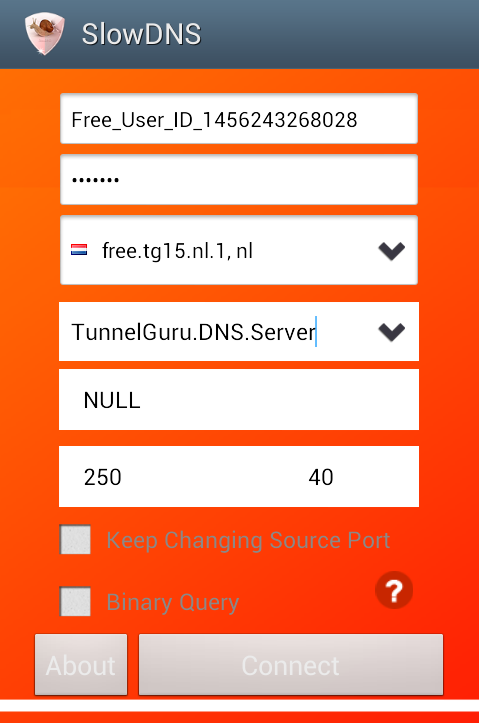
Airtel Slow dns trick 2017 January: Hello Readers, TechinDroid presenting a latest working Airtel SlowDNS VPN trick October 2016. Artel open DNS servers found. Its also like TCP tricks, gives 250 MB/ month free data airtel dns trick. 

Slow DNS setting for airtel

  • At first Download and install Slow DNS VPN on your phone .
  • Open the app And set DNS – 202.56.230.5 airtel dns server ip address
  • Then Click On Connect & wait for some secs.
  • Done You will Get Connected.
  • Thats it guys
Airtel Slow DNS trick 2016 free internet
Replace TunnelGuru.DNS.Server with  202.56.230.5 

If you want to use unlimited use our Tunnelguru premium account. This Airtel free dns trick 2016 works for you? Comment below.

AirTel Direct 3G trcks & All Speed Cap solutions

Hello, readers ..  Currently Airtel direct 3G tricks are working All over india. From July onwards Direct 3G trick Blocked state by state Responsively.This post all about airtel unlimited direct 3G trick & Speed capping solutions. So now airtel updated the firewall .If you consumed all the data from the shared 3G 4G balance your speed will immediately Get Capped Even you dont Disconnect the season. I have tested many 3G pack combinations with Unlimited 2G pack. Finally i got some solutions to Uncap the 3G, 4G speeds. My All SpeedCap solutions are working till now. You can even Disconnect from internet.
AirTel Direct 3G trcks & All Speed Cap solutions

This Airtel Direct 3G trick is working based on the Family sharing feature on Airtel. I did'n posted any direct tricks before because i know Airtel will block it soon. So Grab this speed cap solutions before getting blocked. 

Note: Avoid traveling while using Direct 3G tricks. If you move to another area Network will change .So you may Face Speed Capping issues. 

How to? Airtel Direct 3G Trick

  •  Its simple to use Airtel Direct 3G trick requirements are Not Much. A working airtel 3G or 4G sim, & a 3G supported handset (Android) Recommended
  • Now Reacharge your Airtel sim with Unlimited 2G pack (rates Rs.223 , 225 & 243). Choose any one of them.
  • After Recharging Successful .Now do a Another Recharge A 3G pack with long validity as a ultd 2G pack (Rs. 185 3G pack recommended) &  After recharging the 3G pack .
  • Now Download & install My Airtel App (playstore)
    AirTel Direct 3G trcks & All Speed Cap solutions
  • Open My Airtel App And login with your mobile number.. Then Click on get 300 MB free data banner. & claim your 100 MB  free Night Data. you will recive a confirmation SMS..
  • Then Type New message ADD <10 digit airtel number>  & send to 121
Note: Use another Airtel number in the message

  • After that you will get a Confirmation SMS . make sure its successful Confirmation or not
  • Now Turn OFF your Mobile data & Turn On ,& Start Browsing & Downloading. Download 4 to 5 GB in first day.  
  • Dont Disconnect Internet
  • Next Day your speed will get capped . Dont worry just be patient till Night 12 AM. connect your mobile data after 12 O clock.Now Browse one or two webpages and disconnect internet. If you Get a Data usage alert ..
  • Send Message DEL <Added airtel number> Send it to 121
  • Confirm By Replying 1. Now Connect to internet if  you get 3G speed again .
  • Add the airtel number back ADD  <10 Digit Airtel number> send to 121
 My DataUsage Statististics
Data usage


 Many Speed capping solutions are available & listed below for Airtel Direct 3G trick,you can simply try it and use unlimited 3G till the pack validity.

 Speed Capping Solutions

 I have shared tested and working in TamilNadu Speed uncapping solutions for Airtel Direct 3G trick. You can try these all methods. 

Method #1
  • Recharge your airtel sim by unlimited 2g pack and then Activate any small 3g pack (Dial *567#).
  • use some MB of your 3g data and leave some MB in your account. (Check your data by *121*2# or airtel portal or My airtel app).
  • Now Goto Message and create new sms Type ADD <Any airtel Number> to 121.
  • Now use some data or Download any big file like 50 MB, After using 3-4 MB.
  • Immediately send New message DEL <Added airtel number>  to 121.
  • You”ll get message for confirm , Just reply by pressing or sending 1.
  • Now don’t disconnect your data and get full 3g speed in your 2g unlimited pack.
 Method #2
  • After your Speed get Capped Activate Rs.28 3G pack & Connect with DroidVpn 9201 UDP & ToidVPN 9201 UDP 
  • Use Both VPNs you will get 250 MB after bandwidth limit reached You can Directly use the Free 3G trick
 Method #3
  • First you need to activate Airtel Direct 3g internet trick, Some info : Recharge with unlimited 2G pack then 1 month 3g pack (both packs should have same validity like 28 days)
  • Follow these guide daily before 12 AM to avoid recharging with minimum 3g pack everyday.
  • On 11:55 PM Send sms Add "Any Airtel Number" to 121
  • Browse the internet Normally, but don't download anything.
  • After 12:00 AM your speed will cap but don't worry. DO NOT DISCONNECT INTERENT.
  • Now Create New sms DEL "Airtel Number" to 121
  • All done,Check the 3g 4g speed.You will get complete 3g speed without any balance deduction issues.
  • You can now even connect and disconnect the speed won't be capped.
  • Repeat the steps daily at 11:55 PM
 Method #4

  • Iif you still feeling speed caped after 2g unlimited +3g plan then go simply delete family share number just type DEL 9999××××× to 121 and then go to airtel.in/free and download any app from this list its give you 100 Mb night 3g Data
  • Now again ADD family sharing number ADD 99×××××× to 121 and thats all ......
    Now wait till midnight 12 now start ur data in night ur 12 am and start surfing and download ...
    Your speed is back 
  • Now you can enjoy on unlimited 3g speed again
ScreenShot
AirTel Direct 3G trcks & All Speed Cap solutions
:
 So This post is all about airtel unlimited Direct 3G trick and Speed Capping solutions.

Airtel Hammer VPN UDP trick for Unblocked sim users

Currently Hammer VPN is working without Disconnection on Unblocked sim. Its connecting with blocked sim but  Disconnects too shortly. We don't have any other choice for now to use unlimited Free 3G tricks. Until Find a new working UDP ports. But Vodafone is rocking now in free 3G trick I'll share it soon.
Airtel Hammer VPN UDP trick for Unblocked sim users

Hammer VPN 2.7.6 modded apk file download link given below just Download and install it for avoid server full error and speed capping problem.

Airtel Opera handler trick • 2016

Airtel working opera handler trick Aug 2016

Airtel Opera handler trick • 2016

Airtel is the best network for offering free internet services to their users indirectly.Most of the Airtel tricks are available to get free internet on airtel sim like we shared Hammer VPN trick, Web tunnel VPN trick for airtel. Now we are going to share High Speed Opera Handler trick with Download Supported upto 250 MB

First of all Download new opera handler
Uninstall if you already have opera mini. 
Install downloaded Opera handler on your mobile.

Steps to Get free 3G on opera:


Open opera handler. (Child lock code: www.nextwap.net) 
Select proxy type as Real Host or host 
Tick on remove Port 
Proxy Server: img.airtellive.com

Save this settings
Thats all ☺

Screenshots:


Airtel Opera handler trick • 2016


Airtel Opera handler trick • 2016


Note:
         Limit is 200 MB per day.  Disconnect data in every 50 MB
          AVOID SIM Blocking 

How to fix Hammer Vpn Disconnection problem

Currently We are using Hammer Vpn App for access free Internet on airtel, HammerVpn works very well on when you are started using it,  after 1 or 2 weeks you will get Disconnected in 50 Secs from you get Connected.hammer vpn disconnection problem Airtel is Blocking incoming packets to VPN server every 1 Min. At that time hammer VPN shows 0 Bit/sec.Trickspro is here. You can use tricks without fear :)Have you tired of trying to fix this issue?  No need to be,
How to fix Hammer Vpn Disconnection problem
How to Fix Hammer VPN Disconnection issue - May 2016

We have launched an Android App for Bypassing Disconnection issue ,App is developed by TechinDroid, It's easy to use and  more useful for HammerVpn users to solve hammer vpn disconnect problem.
Hammer Vpn Disconnection problem
Hammer Vpn Disconnection issue
» Also Read: Airtel Blocked sim WhatsApp trick

How to Fix Hammer Vpn Disconnection issue

  • Uninstall previously installed HammerVpn
  • And Delete Hammer Temp dir from sdcard/android/
  • Firstly Download Freedom Firewall-Trickspro.in
  • Then Download this Modded HammerVpn
  • Install both Apps
  • Run Freedom firewall - Trickspro.in App
    Hammer Vpn Disconnects
  • Now write given Comment and Click on Execute
iptables -P FORWARD DROP
Watch video Tutorial on YouTube
  • Non rooted users try Without SU option
  • Now Run HammerVpn
  • Rport: 49202 Lport: 9201
    Hammer Vpn Disconnection problem
    How to Fix Hammer Vpn Disconnection problem
  • Protocol - UDP
  • Then Connect with Any Free server
  • Enjoy!  Airtel VPN trick without hammer vpn disconnects.
»»Keep visit our blog for future Updates««

Solution for Airtel rcconf redirect problem

How to remove one.airtel.in/rcconf redirect After recharging any Data pack on airtel. if you type google.com or any other website url it will keep Redirect you to one.airtel.in/net or one.airtel.in/rcconf page and show you A recharge confirmation message .again and again. if you click dismiss this alert button.its also not works .it will keep redirect you.

Steps to Fix Airtel Redirects

  • IN your mobile GO to Settings>>More settings>>Network settings>>Accesspoint names>>Select Airtel internet configuration
  • Edit the Apn configuration as below

APN:    airtelgprs.com
Proxy:  (Leave balnk)
Port:     8080
  • Save the APN configurations
  • Connect intenet
    How to remove Airtel Recharge confirmation messages after activated 3G 2G data packs
  • Now all websites will work without any redirects

Airtel 3G FinchVPN trick (Daily 150MB)

FinchVPN trick for Airtel
Hello there, after a long time im going to share a Airtel free internet trick with FinchVPN. Which gives you a 150 MB free Data daily . This airtel 3G trick is working with TCP 443 & 53 nicely. FinchVPN premium account will bypass the daily limit.

FinchVPN settings for Airtel


  • First step Download FinchVPN
  • Now install and open FinchVPN
  • New users  register for a trial account Here
  • Fill your username and password then click login button 
Note: you need a internet connection on first time login. You can use Hammer VPN or DroidVPN for login. 
Now Set protocol TCP
And Port 53
Now go to Settings» Enable Custom options
Click Extra OpenVPN configurations

And  fill these settings
http-proxy-option CUSTOM-HEADER Host:one.airtel.in/

http-proxy-option CUSTOM-HEADER X-Online-Host:one.airtel.in

http-proxy 178.62.238.17 3128
Finally go back to Home and Click Connect button
After that you will be get Connected successfully. Enjoy looting airtel :)
This trick is working in Tamilnadu Tested by me. 

Airtel Unlimited 3G Trick with MMSC severs

Hello Techindroid.com,  Readers Today  im have a good news for Airtel Unblocked and blocked  sim users. I have found an unlimited airtel free 3g with airtel MMSC proxy server.  Airtel  MMSC Free 3G trick is completely free to  use no need do a Initial recharge or speed un-capping tricks. No Disconnection issue at all,  unlike airtel UDP port tricks.
Airtel Unlimited 3G Trick with MMSC severs

This trick is working with Psiphon handler 10.8 currently.  I think it's enough  because psiphon is not having a daily bandwidth limit usage. It gives high speed 3G, unlimited to everyone. Just Follow Below Steps to use Airtel Unlimited 3G MMSC trick

Steps to Get unlimited 3G on Airtel

**Important**
In your mobile Go to Settings»Mobile networks»Access point names » Create New Access point

Name: TechinDroid.com
APN: airtelmms.com
Proxy: 100.1.201.172
Port: 8799
Save this settings
  • Now Open Psiphon handler and Select proxy type as Real Host
  • Check on Remove Port 
  • Set proxy server: 100.1.201.171:10021
  • Now set Real proxy type as Direct
  • Real proxy server : 100.1.201.172
  • Real proxy Port 8799

Airtel Unlimited 3G Trick with MMSC severs
  • Now click Save button
  • Now go to Psiphon Options tab
  • Go to More settings and Check on Connect through HTTP proxy
  • Use the following settings and enter Manually this  proxy and Port. 
Proxy: 100.1.201.172
Port 8799
Airtel Unlimited 3G Trick with MMSC severs
  • Now come back to Connection manager click start button. 
  • Wait for some secs  now you will be get Connected
  • Enjoy airtel Unlimited 3G MMSC trick
Airtel Unlimited 3G Trick with MMSC severs
I have tested this trick in Tamilnadu. You should try this and comment below

How to activate Zero Rental 3G pack on Airtel

Now a days Airtel tricks are hard to use The smart Phone network is being smart at hackers. From jun 2016,Airtel is only allowing  to access H+ & H signals when you have a 3G data pack Active .After the end of the pack validity .You will be forced to move 2G/ Gsm network .The only way to access 3G signal back activating small data pack . But after ending the pack validity again you get banned from access 3G services.
Airtel zero Rental 3G

Normally airtel users can't register to 3g network if they have no any valid 3g data pack. So while using airtel free internet tricks users are limited to use 2g network.
So at zero balance users can't enjoy 3g internet tricks at 3g speed.

So What to do now?

Activating Zero Rental 3G plan may save you. There is no option to Directly Activate the Zero rental 3G plan. But, i have 3 methods to activate "0" Zero Rental 3G plans. & All methods Are working perfectly

Also Read »»  10 best Airtel free 3G Tricks

Method #1

  • Send an SMS '3G' to '121'
     
  • you will get a reply message telling - 3g is activated or not
     
  • If you are activated 3g already. then deactivate it first
     
  • Then, Download My Airtel App 
     
 Note- Only download app from Above link, Don't download from playstore. also don't update this app. 

  • Login to your airtel number
     
    How to activate Zero Rental 3G pack on Airtel
  • Then go to 3G  and activate 3G.

Method #2

In this method you have to call Coustomer care & tell them to Activate Zero Rental 3G plan. 
How to activate Zero Rental 3G pack on Airtel

Ill explain it in Steps.. 


  • Dial 198 and navigate it to GPRS helpline.. Talk to Coustomer care service. 

Tell him like that.. 

Coustomer care: Hello sir,  how can I help you? 

Me: Sir im having problems with network registering

Coustomer care: How long u facing this problem? 

Me: sir,  i have Recharged with a 3G pack before. When the pack validity ends.  My sim showing Emergency calls only  & No service. 

Coustomer care: Set your mobile network mode as GSM (2G) mode. 

Me: sir,  here in my area 2G signal strength is very low. Only i can Use it when i was out of my home..  So whenever i want to call,  then i have to go out sir? I can't even receiving calls properly. But  im getting average 3G signal. Now it turned to emergency call. 

Thats all  :) 

Coustomer care: ok sir,  I'll help you to solve this problem,  30 mins after  switch off your mobile and on it. Now your problem will be fixed. 

This trick is personally tested by me...  Working very well

Method #3


This also based on the Coustomer care service. Like second method. 


  • Call Coustomer care tell them to Activate Zero Rental 3G plan. They will say  there is no such packs available sir, pick any data packs 28,   80 MB 3G. 
  • No sir i want to use 3G by deducting my  Main balance. I don't need data pack .. That's all they will Activate Zero Rental 3G plan in 30 Mins ..you will receive a Confirmation sms for that 
Enjoy airtel free 3g tricks at 3G speed 

10 best Airtel free 3G Tricks that you might be missed

Hello readers . Today I'm gonna share all working Airtel free 3G tricks July 2016 on this single post for save your time. Airtel is blocked some tricks before and i have found some solutions for it. But it's too hard to get know that. In this special Post im going to openly share premium working tricks for everyone.
10 best Airtel free 3G Tricks that you might be missed

This post contents Airtel VPN tricks,  Airtel Proxy tricks,  Airtel Cgi-proxy tricks,  Airtel HTTP proxy tricks, Airtel VPN over proxy tricks, Airtel DNS trick, and much, much more..

AirTel Blocked sim free 3G trick with DroidVPN

Airtel stopped all blocked sim free 3G tricks from last month. I have worked hard to find new working trick for blocked sim . This trick Is based on TCP protocol you may also use any other VPN software like Troid, Hammer , FinchVPN . In this trick we use new host that tweaked from airtelgurus.com .this host blocked already But this host working now with some sub-domain host.

AirTel Blocked sim free 3G trick with DroidVPN

>>Also Read: Airtel Sim unblocking trick

Steps to Use Airtel Blocked sim trick

  • Firstly Download & install DroidVPN mod
  • Open DroidVPN & enter your Login details
  • You are new to DroidVPN? Register new account here
  • Save your Login details
  • Go To DroidVpn >>Settings>>Connection protocol>> TCP
  • Next Go to Port Settings

Set UDP port  0

Set TCP port 53 or 443

Bind To local port 0 

  • Save it
  • Now Go to HTTP Headers Option

Host: test.airtelgurus.com/News
X-Online-Host: test.airtelgurus.com/
  • Save this configurations
  • Now come back to DroidVPN connection manager
  • Click Connect Button
    AirTel Blocked sim free 3G trick with DroidVPN
  • Thats All ,You wil be get connected.......

Airtel Free 3G Frontquery trick For UC & Opera Handlers

Howdy readers.. Airtel new working cgi proxies for opera and uc handlers .some of the proxies gives high speed browsing and downloading try all configurations one will work.airtel free 3g trick for june july 2016

Airtel Free 3G Frontquery trick For UC & Opera Handlers

How to use airtel front query trick

  • Firstly download and install UC handler or Opera handler
  • Create new accesspoint by Goto phone settings>>Network
  • settings> > access pointes names>> Add
  • new
  •  Now enter details [ above details like
  • name, apn, proxy and port ]
  • Save settings and set new apn default

  Accespoint configurations
 Apn: airtelgprs.com

 Proxy: 205.185.112.53

Port: 80


How to set front query in handler
  • Open installed uc or opera handler app
  • And look for front query box
  • Just paste the given front query
  • Then save and run
Airtel Free 3G Frontquery trick For UC & Opera Handlers

Handler Settings :
Frontquery : 125.21.246.113/b.pl/en/index/http/


APN Settings [Network Profile] :
/

Apn: airtelgprs.com


Proxy: 144.76.220.213  


Port: 80
Handler Settings :
Frontquery : 125.21.246.116/~som/cgi-bin/x.pl/00/http


APN Settings [Network Profile] :
/
  Apn: airtelgprs.com
 

 Proxy: 198.50.195.188

  Port: 80

Handler Settings :

Frontquery : 125.21.246.113/n/cgi-bin/x.pl/00/http

APN Settings [Network Profile] :
/

  Apn: airtelgprs.com

  Proxy: 192.168.20.25

  Port: 80

Handler Settings :
front query: 1.airtel.in/cgi-sys/defaultwebpage.cgi

Airtel free 3g with TroidVPN TCP trick (New host)

Airtel new free 3G TroidVPN TCP trick for Android users. This trick is based on TCP 53 (open Port)  with new Tweaked host. Soo you can Use free 3g on Airtel  with huge daily limit ie 200 - 300 MB/day. I just found out that trick just two days ago it working fine till now. Without sim block problem
Airtel free 3g with TroidVPN TCP trick (New host)

TroidVPN app daily gives you free 150 MB free data. If you want to use unlimited buy a TroidVPN premium account. Or use X-privacy, Donkey Guard for bypass the daily limit.

Steps to use TroidVPN TCP trick


  • Firstly Download and install TroidVPN
  • Open TroidVPN
  • And set any configurations listed below

#Configuration 1
  • Rport 53 Lport 8080
  • Protocol TCP

#Configuration 2
  • Rport 53 Lport 0 or 80
  • Protocol TCP

#Configuration 3
  • Rport 443 Lport 0
  • Protocol TCP
Airtel free 3g with TroidVPN TCP trick (New host)


  • Now Click on Advance option on TroidVPN
  • Set DNS as 202.56.230.6
  • Tick Use proxy for TCP connection

 Proxy Host:   52.29.160.137
 Proxy Port:    8083 
 Header: Host: 125.21.246.3/Rconf 
Airtel free 3g with TroidVPN TCP trick (New host)


  • Click Save button to save this configurations
  • And connect TroidVPN
  • When you  see this notification that means you are connected successfully

Airtel free 3g with TroidVPN TCP trick (New host)
After successfully connected
Minimize TroidVPN
And you can Use all Internet applications like WhatsApp,  Facebook,  messenger etc

Proof:
Airtel free 3g with TroidVPN TCP trick (New host)

Note: Daily change hosts for get more free data


Airtel Unlimited 3G Trick Via Psiphon Advance handler June 2016

                                  Airtel Unlimited 3G trick Via Psiphon Handler Advance

Steps To Follow :-


  • Download Psiphone Handler 10.8 Advance  Download Here
  • Now Install And Open
  • Make Below Settings On Handler Menu
  • Mark – Remove Port
  • Proxy Type – Real Host
  • Proxy Server – in.airtellive.com
  • Now Save The Settings And Start Browsing And Downloading…! Enjoy!

Note:
  • 1. Use Apn – 8.8.4.4 only, No Proxy/Port
  • 2. Disconnect On Every 100 MB for avoid sim blocking And Change Free Host On Proxy Server
  • 3. Above Trick Have No Sim Blocking Issue By Using Many Hosts 

Airtel SlowDNS VPN Unlimited 3G Trick with Tweaked high-speed [May 2016]

Trickspro is back with another Tweaked unlimited 3G Trick With SlowDNS VPN with 4G Speed. Slowdns servers updated now. 
Airtel slowdns vpn trick
Airtel Unlimited 3G SlowDNS VPN trick

Steps to use SlowDNS VPN trick on Airtel

  • APN: 8.8.4.4 (Settings» more settings» network settings» access point names» New)
  • Activate small 3G pack for better speed.(if speed drops)
  • Download and install SlowDNS VPN | Mirror
  • Put DNS IP - 59.144.127.117 or 202.56.215.41 or 202.56.230.6
  • If above DNS not works for you. 
  • You can find your respective dns in DroidVPN
  • Setting» General Settings» (enable) Debug logging.
  • Connect droid vpn. 
  • Now u can see Current DNS Gateway ip
  • You can Use that DNS ip on SlowDNS
  • Select any free server
  • Put your preferred DNS
  • Then Connect
  • if u see Authenticating (Open DNS)
  • speed varies 150-300 KBps
  • If you see server full error (try different server)

SlowDNS unlimited Usage Trick

  • If u see your daily limit reached
  • Then disconnect VPN
  • Uninstall SlowDNS
  • Filemanager: internal storage» android» DELETE playstor.srf and slowdns Folder.
  • Change your Android id
  • INSTALL any old version SlowDNS.(important)
  • It will get Connect.
Tags: airtel slow dns vpn trick, Airtel Unlimited slowdns vpn trick, slowdns vpn unlimited usage Trick

Airtel Unlimited 3G VPN Configurations for Blocked sim users- (June 2016)

Hello trickspro users, Today im sharing Airtel working TCP/UDP OpenVPN configurations without any survey. No bandwidth limit or daily limit for this trick. OpenVPN not have any bandwidth limitations  so you can surf unlimited Internet. Airtel is keep blocking every working tricks. It's hard to find new one.  So Grab this trick before get blocked by Airtel.
Airtel Unlimited 3G VPN Configurations for Blocked sim users- (June 2016)

Requirements

  1. Airtel 3G Enabled sim
  2. Pc or Android mobile
  3. VPN tunneling software (Given below)

Steps for Pc users

  • Firstly Download and install OpenVPN | mirror
  • It will Install OpenVPN tap drivers and setup
  • Run OpenVPN as Administrator on your pc
  • Extract Downloaded Configuration files (Given below) 
  • Move all extracted .ovpn files to
C:\\program Files\OpenVPN\Configurations
  • Now restart OpenVPN
  • Now Go to your system Tray» Right click OpenVPN 
  • You will see updated configuration files
  • Now select server
  • Configuration required username and password
Username: vpnbook  
Password: 7haCAbre
  • Now click connect. 
  • Then you will be get Connected successfully! 
  • Enjoy Unlimited free 3G on Airtel 
Screenshots
Airtel Unlimited 3G VPN Configurations for Blocked sim users- (June 2016)

Airtel Unlimited 3G VPN Configurations for Blocked sim users- (June 2016)

Steps for Mobile users

Download and install OpenVPN
Run OpenVPN app
Download airtel Unlimited 3G configurations (Given below)
Extract all configuration files to your sdcard
Then go to OpenVPN Click options» import configurations from sdcard
Select extracted configurations
Then click on Connect! Put given username and password
Username: vpnbook  
Password: 7haCAbre
You will be successfully get Connected to vpn server

» Download Airtel Unlimited 3G configurations «


Note: Zip password  trickspro.in
Enjoy free Facebook whatsapp and everything that runs with Internet

Airtel Offer: Grab Hello Tunes subscription for 999 days Absolutely Free

Airtel free Caller tunes offer. Airtel Hello Tunes offer.Airtel- The largest Cellular Operator in India, has banged with a superb Freebie offering one of the money deducter Service “Hello Tunes” for free. Yes, it is offering Hello Tunes subscription for 999 days “Absolutely free”. Isn’t amazing
Airtel Offer: Grab Hello Tunes subscription for 999 days Absolutely Free

Steps to get free Hello Tunes subscription


  • Call 5787809 from your Airtel Prepaid number
  • Now, Select your language and Press 1 to select the song.
  • Finally, press 5 for your Confirmation. 
  • Thats it !!Bingo !! You will soon get a confirmation message and the service will activate within an hour
Note: However after 999 days, this service will be chargeable, then stop the service by messaging “ STOP ”and send it to 155223. Your service will be deactivate soon !!
Enjoy free Caller Tune services on Airtel