Showing posts with label iOS. Show all posts

Install Pokemon Go • iOS & Android [Tutorial]

In this post i'm going to tell you a alternative methods to install pokemon go. Unless you live in a cave for several days, in which case you missed the episode Rumble world ,so on, you are obviously aware of the wave that is shaking the world wide web, namely the Th release of Pokémon Go! And although the game was officially released not in our web regions, there are small simple methods so that you can also get out of your dens to go capture Pokemon in real life. The foot what! i will post later how to play Pokémon Go
Attention methods that follow should be used with caution, Pokémon Trash declines all responsibility in case of trouble :) Be especially cautious of files from untrusted sources, the latter being pox and contaminate your device.

For Android devices

This is the easiest method of both. Note that for this to work, your phone must be relatively recent (Android 4.4 KitKat minimum and be part of the list below. If it does not, try anyway). Start by going to download the .apk file of the game directly via your phone. Please do not click anywhere, but the right button Download (it will cause you to be alert for Pokemon GB). Once the app is downloaded, it should install automatically. If it does not, do not panic, you just allow the app to install. To do this, perform the following operation:
- Settings
- Screen Lock / Security
- Unknown sources (check this box)
Now you just have to get started in the adventure!
The list of compatible phones for now:
Samsung Galaxy S7
Samsung Galaxy S7 Edge
Samsung Galaxy Note 5
Samsung Galaxy S6 Edge+
Samsung Galaxy S6 Edge
Samsung Galaxy S6
Samsung Galaxy Note 4
Samsung Galaxy Note Edge
Samsung Galaxy S5
Nexus 5 (2013)
Nexus 6 (2014)
HTC One (M8) – 2015
HTC One M9 –  2015
HTC Desire Eye
HTC Desire 816
HTC Desire 820
HTC Desire 826
HTC One M8S
HTC One M8 Eye
HTC One E8
HTC One M9+
HTC One E9
HTC One E9+
HTC Butterfly 2
HTC Butterfly 3
Huawei P8
Huawei P8 Lite
HTC Mate S
HTC Ascend Mate 7
Honor 7
Honor 6+
Honor 6
Honor 4X
LG G4
LG G3
Moto X Pure Edition
Moto X Style
Moto X Play
Moto G 2015
Moto X 2014
Moto G 2nd gen
Motorola Droid Turbo 2014
Moto Maxx 

For iOS users

Method: hipstore
Unlike your fellow Android, this will require a tad more manipulation on your part, although not really the end. Start with the chopper file by following this link and then will follow again the following little manipulation:
- Settings
- General
- profile
- Trusting the editor
Note that this will work with the versions of iPhone 5 or above only. 

Second method: create an Australian account on Itunes

You need i-Tunes on computer, then log in your account and you go down the blind (on the pc always) to change the country.
Take Australia and download a free application (any). Sign up for the means of payment choose "none" (no) and to address the Australian find one randomly on Google Maps.
You can download Pokemon GB on the Australian store, once done, transfer it to your i-Phone. It will work on your real account Apple!

And that, normally everything is good now, there is more to go out and capture tiny creatures! Keep us posted if it worked and if you have phones that are not part of this list to update the list.

Tips to buy&Sell used iPhone online

Tips to buy&Sell used iPhone online
Today i'm going to share you a tips for to buy used iPhone online & sell your iphone online with a good price. Apple products designations are Attract peoples, of course, already impatient with the launch of the iPhone the latest generation which will be held in the near future. 

That is, it could be, it's time to sell your iPhone and prepare extra money for buy the new iPhone. 

Or maybe you prefer to buy an iPhone scars. If you choose the latter option, there are some things you should know before buying a used iPhone. Check the ESN and IMEI first thing to do is check the ESN serial devices are 'clean'. When an ESN or IMEI is not clean, it means that the iPhone has been reported stolen.

All you have to do is create a free account on OLX & Submit your free ad about your product you will get a lot of buyers for your phone.

powered by OLX

Select your city and view local Ads
Browse Categories
Search for a specific product
X

How to play Pokémon GO? (Full guide)

Pokemon GO is a Pokémon game: this means that it is a simple set of ports, but may require a lifetime to grasp the subtleties, the nuances. And when it arrives in the Pokémon universe with this mobile application in two weeks became a real social phenomenon, not easy to know how. So how much playing Pokémon GO? pokemon go tips What are the best techniques to become a Pokémon master of choice? This is the question that we asked ourselves to give you the best gaming techniques as you begin your game Pokemon Go!

How to play like a pro?


We all in the family cousin a computer that takes us out of the keyboard shortcuts of nowhere. Pokémon with GO, well it's the same. Except that with our ultimate advice is that you the player will play like a pro in Pokémon GO. In addition to the first advice given by Master Brunus in our guide how to get started with Pokémon GO , here more a more general record on good practices and habits needed to play well in Pokemon Go! Here are the questions we answer in this Guide : - How and why wild Pokémon it appears in Pokémon GO - How to launch its Pokéball like a pro in Pokémon GO - What is the meaning of colors in capturing a Pokémon? - How to earn more XP in Pokémon GO ? - New on 07/25/16: how to win a max of XP with egg Chance? - the best technique to change his Pokémon - How to find the strongest Pokemon? - How to find a Pokemon? - How to win fight in an arena? - How to earn Free Poképièces? - How to spend his Poképièces in Pokémon GO? If you have questions, do not hesitate to seek help from Pokémon masters of Nintendo Power, or give us your own pipes via our contact form! The hunt is on in France so ... good game at all! To show that you are a pure play, when the game is started with friends marveled around, press the Pokéball: instead of tapping and then select your topic in the menu, so leave your finger on the screen and go left to access your list of Pokémon, or right to access your list of items. You will gain a little time, but especially the esteem of your peers Pokémon trainers. Guaranteed effect!

How and why wild Pokémon it appears in Pokémon GO?

When a Pokémon appears on your screen, do not say it's a coincidence. Well ... Not that! Indeed, a Pokémon may arise for various reasons: 
- It is expected by the game and so it naturally appears here according to criteria such as the type of environment where you are for example 
- He was attracted by a lure Module asked another player 
- he was attracted yOUR lure Module to learn which method has led to the emergence of this Pokémon where you are, you just have to study the color of the ring around the Pokémon in question on the map. Go a little color code families that goes: - White Ring: natural and normal appearance of Pokémon - purple ring: appearance due to incense posed by another player - pink cloud: you are the only one to see this . Pokémon If you ever see a Pokémon in that famous pink cloud, there is no need to report or to dozens of players who play casually passed you, nor the Poké Radar type applications: only you can see this Pokémon, only you can catch him. Avoid sudden riots and crowds shouting victory for yourself and putting all your energy into catching this Pokémon Pokémon GO offers to you, so just for you!

How to launch Pokéball like a pro in Pokémon GO

The launch of Pokéball will one day be an Olympic sport. Obviously! But we're not there because we have to learn for the moment to launch our Pokéball correctly. This has an advantage: it allows you to earn extra experience points, allowing you to level up. Level up, for the record, then captures stronger Pokémon as they appear more frequently on your card. And as we never have too much Pokeballs in its equipment, better not to launch ten Pokeballs to capture a single 
To capture a Pokémon, first remember that it is better not to stay in the middle of the road. An obvious advice, but in the madness of the action, you never know! Remember, once the magic of augmented reality past, disable the RA in order to save your battery and make it stationary Pokémon. You will see a ring around the Pokémon you want to capture. In this ring, you'll see a second colored that it shrinks. The color tells you if this Pokemon is a difficult animal to catch. Your goal is to launch your Pokéball by touching the inside of the ring that narrows. This is what will allow you to gain some points bonus experience with a success indicator of your start: Nice (10 XP also), Super (50 XP costs) or Excellent (100 XP, it starts getting interesting!) so waiting for you according to your shots. in addition to earning XP in addition, a nice run also increases, according malignant who have studied the code of the game, your chances of a successful capture, as does Pokéball the lifter to launch in the twirling before releasing. To earn these points in addition to XP, needless to say it is best to turn off augmented reality. It's less fun but more effective. You choose !

What is the meaning of colors in capturing a Pokémon?

We explained earlier that it was necessary to take into account the color of the ring that shrinks around the Pokémon to judge the difficulty in capturing it. Indeed, there are 4 levels of difficulty, each resulting in a different color: 
- Red ring: a Pokémon very hard to catch 
- Orange Ring: difficult 
- yellow ring: moderately difficult 
- Green Ring: easy Pokémon as any to catch !
Red, orange and yellow so indicates a Pokémon that will give you a bit of trouble: to capture it, you may need to use several Pokeballs. If you are just a little Pokémon balls, you can count on a few items to help you: 
- Framby Bay: Use this item to reduce the capture of Pokémon from one level of difficulty. Note that this only works once, and if the Pokémon escapes the Pokéball, it would give him a second Framby Bay to renew the capture attempt. 
- Super Ball: This ball is more efficient than conventional Pokeball and allows you to have a better Pokémon catch rates. This item is quite common in Pokéstops and level change presents, but much less common than Pokéball, obviously.

How to earn more XP in Pokémon GO?

GO Pokémon is a Pokémon play. And as such, it is the quality of your avatar in the game: you are a trainer, and the other players will measure your value to your rank. Rank this increases with the number of XP you gain in the game. 10 XP 50 XP here to there, through the 500 XP bonus when you discover a new type of Pokémon that advance faster or slower.

How to win in combat in an arena?


It is believed that the first visit of an arena, once reached level 5, is a fiasco for the majority of us. And for good reason: lack of physical preparation of his Pokémon, lack of explanation from Niantic when you get in the arena ... and power of Pokémon left there by trainers already past and winners in the arena ... There ' was enough for this fight quickly turns into a fiasco and knocks your Pokémon! for a chance to win, different techniques have been developed, but one of the most effective is the following: - Use your strongest 6 Pokémon in an arena, and make sure to give them more power as possible before starting the battle - the beginning of the fight, wait until the screen flashes yellow: at that time, swipe right or left to counter the attack of the enemy. This flash occurs throughout the fight, then you can adopt a pace of flash-avoidance attack until after the battle.
Note that some attacks can not be avoided, but overall you should be good to get out. - The defending Pokémon attack the arena at a rate of one attack every 1.5 seconds: useless to launch two attacks simultaneously.

How to jailbreak? What is it? (iOS 9.3.3 Jailbreak)

The jailbreak tool for iOS 9.2 and iOS 9.3.3 was released. So, How to Jailbreak iOS 9.3.3? We describe how to do this step by step guide of our iOS 9.3.3 jailbreak process.
Jailbreak fans have long awaited the absence of clear new iOS updates. IOS 9.3.3 update has spent the emergence of vulnerability with the panga team action. Pang of the team holding fast the hand iOS 9.3.3 Jailbreak offered tool discounts today.

iOS 9.2 and iOS 9.3.3 for your version of the jailbreak tool now Chinese 's version. Well, that does not know how to Jailbreak Chinese? This guide explains step by step how to make them our iOS 9.3.3 jailbreak process.

Jailbreak process iOS 9.3.3? 
This process could damage the software and possible Restore (reset) noted that victims need to get a backup in case you encounter not with the process.

How Jailbrek iOS 9.3.3?

Step 1: Download iOS 9.3.3 jailbreak tool here.

Step 2: iOS 9.3.3 jailbreak tool Windows PC " Manager as the  Run " to open the Network tool.

Step 3: iPhone or iPad in Settings> iCloud in the section " Find My iPhone " feature off. Then again, in the Settings section you should remove your password  .

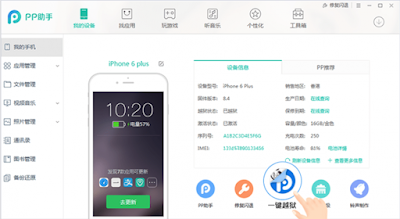
Step 4: Connect iPhone or iPad to PC "Connect it and  run jailbreak application. Once you open the app, click on the portion in the image below.
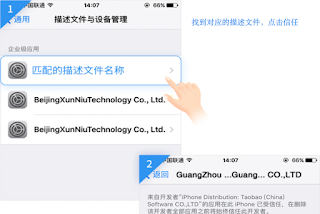
Step 5: After performing the above operations iPhone or iPad profiles to be sent. Install this profile. In this section, Apple ID 'will be asked to enter the CPC.
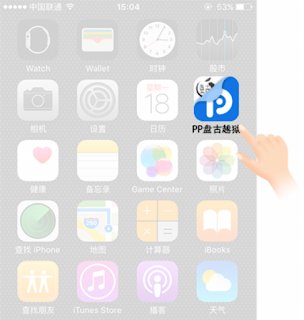
Step 6: Profiles on the home screen after installing the PP will appear in the application. This click.
Step 7: Open PP Application sections in the visual Once you open the application.
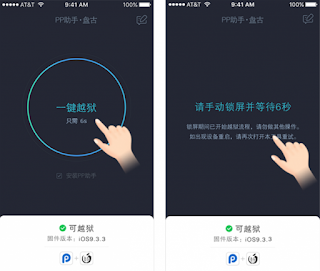
Step 8: Click on the round section located in the Applications screen. After clicking the lock button and wait for this part of the structure. Your device is  insufficient storage space disregard this warning will be given. Once finished, jailbreaking the application a statement you will receive. This statement is open .
Step 9 : After doing the above procedure, your device will reboot and Cydia applications will take place on the main screen. Cydia , open the application and wait for the repurchase of update. If you install an update in Cydia sure to avoid problems .

WhatsApp Update comes with New Features

Instant messaging service WhatsApp updated with the new features in iOS applications. WhatsApp our news comes with the update.
Facebook owned WhatsApp continues to renew itself constantly with updates. Some features are still testing WhatsApp today, iOS updated applications on the platform. WhatsApp update the content of user-oriented improvements and can say that the better performance in speed.

What's New in Version 2.16.7 WhatsApp

- If you send a single emoji it appears as large.

- WhatsApp to zoom in video recording, slide your finger up and down on the screen.

- Now, when you tap the Edit button at the top of the Chat tab, delete, mark as read, or you can select multiple messages for archiving.

- Chat now open more quickly.

Download WhatsApp update from the App Store